


Reelzy
4.6103.00 Reviews
App Specs
- Version
- 1.2.0
- Updated On
- License
- Free
- Downloads
- 100,000+
- Developer
- Austrea Group Ltd
- Categories
- Lifestyle
- Platform
- Android
Screenshots
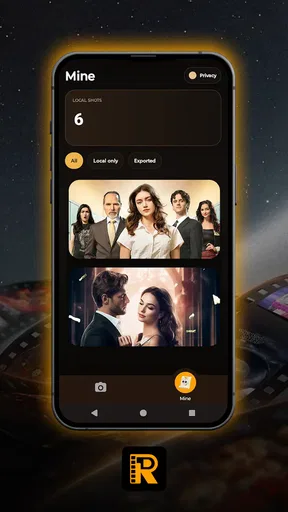



 Analysis by AppCompare
I approached Reelzy as a small, practical lifestyle app rather than a full photo editor. Its purpose is focused: it adds watermarks containing time, date, and location information to images or videos. That narrow idea is useful when the context around a moment matters as much as the moment itself. A travel memory, a property inspection, a delivery record, or a quick field note can become easier to understand later when the basic circumstances are visible on the media.
The first thing I noticed is that Reelzy is not trying to replace a general camera editor. It is better understood as a finishing tool for people who want their media to carry a little more context. The app is free, aimed at Everyone, and developed by Austrea Group Ltd. Its store short description is simply “Reelzy,” while the more useful explanation is its ability to add time, date, and location watermarks.
That distinction matters before you install it. If you want filters, layers, advanced retouching, detailed typography controls, or a complete social-media design studio, this is probably too focused. If you regularly need to show when or where something was captured, the focused approach makes more sense. In my experience, the value comes from reducing a small but recurring task, not from offering a huge collection of editing tools.
What to expect when you open Reelzy
The app has a clear practical role: prepare media so that its timing and place are visible at a glance. That can be helpful for personal organization as well as documentation. I can imagine using it after a trip, during a home project, or while collecting visual notes that may be difficult to identify later from the image alone.
The most important expectation to set is that a watermark changes the character of the original image or video. The added information may be exactly what you need for a record, but it can also distract from a carefully composed picture. I would therefore treat Reelzy as a deliberate choice for specific media, not as an automatic step for every photo in my library.
A useful way to decide is to ask what the recipient needs. If I am sending a scenic photograph to a friend, a visible location and timestamp may feel unnecessary. If I am sharing a picture of a damaged item, a work area, or a place I need to identify later, those details can make the file much more useful. The watermark should support the purpose of the image, not compete with it.
Reelzy is listed as a lifestyle app, which fits this everyday-documentation angle. It is not presented as a professional evidence-management system, and I would not treat a stamped image as a substitute for keeping the original file. For important records, my habit would be to preserve the untouched media and use the watermarked version as the convenient copy for viewing or sharing.
Worth Reading Before You Choose

EA SPORTS FC Mobile 26 Is a Bigger Football Game, but It Takes Time

Flipboard Shows What News Apps Must Do Beyond the Feed

Switching to Android Auto Means Rethinking Your Driving Routine

Google Calendar Makes a Crowded Week Easier to Manage

Ludo King Makes the Most of the Minutes Between Plans

Baby Panda World Brings Quick Play to Modern Phones, but Its Game Library Feels Busy
That simple two-copy workflow is one of the most useful ways to avoid regret. The original keeps the image clean for future editing, while the Reelzy version communicates context immediately. It also avoids the common mistake of adding text to a photo and later wishing the underlying image had remained unaltered.
Getting through the first setup
After installing it, I would begin with a low-stakes image rather than an important family photo or a file needed for work. This gives me a chance to understand how the app handles the selected media and where the watermark appears. Starting small is especially sensible with any tool that writes information directly onto an image or video.
The app supports devices running Android 8.0 or later, so compatibility is straightforward for many older phones as well as newer ones. Its current version is 1.2.0. I would still check the device experience before planning a large batch of files, because a lightweight utility can feel very different depending on the phone, camera output, and media type being used.
For the first setup, I would keep the goal narrow: choose one recent photo, add the available context, and inspect the result carefully. Look at whether the text is readable, whether it covers an important part of the scene, and whether the location information is appropriate to share. That last check is easy to overlook. A watermark can make a file more informative for you while also revealing more than you intended to a wider audience.
Location is particularly worth treating as a sharing decision rather than merely an editing option. A picture from a public landmark may be harmless, but a photo taken at home, at a child’s school, or at a private meeting can expose sensitive information. I would use the location watermark when it serves a clear purpose and leave it out when the recipient does not need that detail.
Another practical preparation step is to decide whether the media is for documentation or presentation. Documentation benefits from visible context. Presentation often benefits from a cleaner frame. Making that choice before processing several files prevents the app from becoming part of an automatic routine that does not fit every situation.
Reaching the first meaningful result
The first successful action should be more than opening the app. It should be producing one watermarked file that answers a real question: when was this taken, where was it taken, or both? For example, I might photograph a repair area before leaving the site, apply the date and location watermark, and send that copy to someone who needs to recognize the visit without asking me for extra explanation.
That workflow is useful because it connects the app to a real outcome. Instead of experimenting with every possible option, I can judge the result by its clarity. Can another person understand the basic context without zooming in? Does the watermark remain legible against both dark and bright parts of the picture? Is the placement sensible for this particular scene?
For travel, I would use Reelzy selectively. A dated and located image can be valuable for a personal travel log, especially when many similar photographs accumulate. I would not stamp every artistic shot, though. A better approach is to mark practical reference images, such as a trail entrance, a meeting point, a rental property condition, or a sign that I may need to identify later.
For household tasks, the app could help create a simple visual sequence. Before-and-after pictures of a repair, renovation, or delivery can be easier to sort when the date is visible on the media itself. The trade-off is that the watermark becomes part of the picture, so I would keep clean originals if the images might later be used in a presentation, listing, or formal report.
There is also a useful distinction between memory and proof. A watermark can make a personal record easier to organize, but it does not automatically establish the full circumstances of an event. I would use it to add context, not to make claims that the image alone cannot support. That is a more realistic and responsible way to get value from the app.
Where new users may hesitate
The biggest source of confusion is likely to be the difference between a camera timestamp and a watermark added after capture. The visible text is part of the exported media, not just a temporary label floating above the original. That is why I recommend testing with a duplicate or unimportant file first. Once the purpose is clear, the workflow becomes much less intimidating.
Another point that deserves attention is location accuracy. A location label is only useful when the underlying location information is available and appropriate for the moment. I would not assume that a visible place label replaces checking the actual scene or confirming the address separately. When precision matters, review the finished media before sending it.
People may also wonder whether the app is suitable for videos as well as still images. Its purpose covers time, date, and location watermarks for media, and the store summary specifically refers to adding these details. I would nevertheless begin with a still image, then test a short, nonessential video if video is central to my workflow. That staged approach makes it easier to spot differences in readability and presentation before processing something important.
Sharing is another area where restraint helps. A location watermark can be useful in a private conversation but inappropriate on a public post. I would make separate choices for private documentation and social sharing rather than assuming one exported version works for both. In practice, keeping the clean original and creating a context-rich copy gives me more control.
Reelzy also should not be confused with a full archival system. A stamped file may be easier to recognize, but it does not replace sensible file names, folders, backups, or notes. My preferred workflow would use the watermark as a visual shortcut and keep the surrounding organization elsewhere. That combination is more reliable than expecting one small app to manage the entire history of a project.
How it compares with familiar alternatives
The usual alternative is to use the phone’s built-in camera and add details manually later with a general photo editor. That approach can work, but it introduces extra steps and makes consistency harder. If I only need a date and place on occasional images, manual editing may be perfectly adequate. If I repeat the same task often, a focused watermarking tool is more convenient because the purpose is already defined.
Another alternative is a note-taking app with an attached photo. Notes are better when I need a longer explanation, a checklist, or a conversation around the image. Reelzy is better when the context should travel with the media itself. A recipient can see the key details without opening a separate note, although the visible overlay is less flexible than a caption that can be edited independently.
Dedicated professional documentation platforms may be a better choice for teams that need structured records, approvals, or a broader audit trail. Reelzy’s appeal is its simplicity. I would choose it for personal use, quick field references, and straightforward sharing, not as a replacement for a specialized system with formal reporting requirements.
There is also a creative trade-off against ordinary editing apps. General editors offer more control over appearance, while Reelzy’s focused purpose can save time when visual polish is secondary. If I am preparing a poster or a carefully designed social post, I would reach for the general editor. If I need a clear contextual marker on a practical photo, the dedicated approach is more direct.
Who will get the most from it
I think Reelzy suits people who repeatedly ask themselves, “When and where was this taken?” Travelers can use it for reference images, renters can use it when recording a property’s condition, and people managing repairs can make before-and-after media easier to sort. It can also help anyone who shares visual updates with someone who is not physically present.
It is especially useful when speed matters more than elaborate design. A person documenting several locations may not want to open a full editor, create text boxes, adjust alignment, and repeat the process. A focused workflow can turn that recurring chore into a quick finishing step.
I would be more cautious if my main goal is artistic photography. A visible overlay can reduce the clean look of an image, and the information may become visual clutter. The same applies to people who need advanced control over fonts, placement, branding, layers, or export presentation. In those cases, a broader editing tool is likely the better fit.
Privacy-conscious users should also think carefully about location sharing before making the app part of a routine. The feature is useful precisely because it makes place information visible, but that benefit becomes a liability when the audience is broad or the location is private. The safest habit is to match the watermark details to the recipient and keep the original available for a different version.
My next-step workflow after the first test
Once the first image looks right, I would create a simple personal rule: use Reelzy for reference media, not automatically for every capture. That rule keeps the app useful without allowing the watermark to dominate my photo library. I would also review the final image before sharing, paying attention to readability, placement, and whether the location should be visible.
For repeated tasks, I would prepare the surrounding workflow rather than relying on the app alone. Keep originals in their normal folder, use the watermarked copy for quick communication, and name or sort the files in a way that matches the project. This makes the app part of a dependable process instead of a one-off novelty.
The app has already attracted a 4.6 average from around 7.4 thousand ratings and has passed 100 thousand installs, which suggests that its simple idea resonates with a meaningful audience. Those figures do not change the basic trade-off: its usefulness depends on whether visible time, date, and location information belongs on your media.
My overall opinion is positive for that specific job. Reelzy is free, approachable, and focused enough to make contextual images without forcing me into a large editing suite. I would recommend it to a friend who needs quick visual records or location-aware memories, with one condition: keep clean originals and think before exposing private places.
For a first-time user, the best path is reassuringly simple. Start with one ordinary image, inspect the watermark, test the result against the purpose of the file, and only then make it part of a regular workflow. If that first stamped image saves you from explaining when or where something happened, Reelzy has done exactly what I would want from this kind of lifestyle app.
Pros
- Quickly browse short-form videos in a familiar
- easy-to-use feed.
- Discover new creators and trending content with minimal setup.
- Lightweight entertainment option for short breaks or casual viewing.
- Simple interactions make it easy to like
- share
- and follow content.
- Personalized recommendations can improve as you watch and engage.
Cons
- The feed can become repetitive if your interests are quite specific.
- Frequent short videos may encourage extended
- unplanned screen time.
- Content quality varies widely between creators and uploads.
- Some features may depend on an active internet connection.
- Privacy settings and data practices should be reviewed before signing up.
FAQs for Reelzy
What is Reelzy and what can I use it for?
Reelzy is designed for users who enjoy discovering, watching, and interacting with short-form video content. After exploring the app, I found its main experience focuses on quickly browsing a personalized feed, engaging with videos, and potentially sharing or creating content, depending on the features available in your version. It is best suited to casual entertainment and social discovery rather than long-form viewing.
Is Reelzy free to download and use?
Reelzy can generally be downloaded without an upfront purchase, but the exact cost structure may depend on the platform and region. Some features, content, subscriptions, advertisements, or optional in-app purchases may be available. Before confirming a purchase, I recommend checking the app’s store listing and payment screen carefully, especially if the application offers premium tools or recurring subscription plans.
Does Reelzy require an account or personal information?
The amount of information required can vary depending on how you use Reelzy. Basic browsing may be available with limited access, while commenting, following creators, saving content, or uploading videos may require registration. During setup, review the permissions requested and the privacy policy. Avoid providing unnecessary personal details, and use a strong password if you decide to create an account.
Can I use Reelzy without an internet connection?
Reelzy is primarily intended for online use because videos, recommendations, profiles, and social interactions usually need an active internet connection. Some content may load temporarily or be available through app caching, but you should not assume that full offline viewing is supported. A stable Wi-Fi or mobile-data connection will provide smoother playback and help reduce interruptions while browsing the feed.
Is Reelzy safe and suitable for children?
Reelzy’s suitability depends on the content uploaded by users, the platform’s moderation practices, and the age rating shown in your local app store. Short-video platforms can include material that is unsuitable for younger audiences, along with public comments and contact from other users. Parents should review privacy settings, enable available content controls, discuss responsible sharing, and supervise younger users.


